Free QR Code Scanner – Scan QR Instantly
QR Code Scanner – Scan and Generate QR Codes Online
Scan QR codes from images or webcam. Generate custom QR codes. All in your browser.
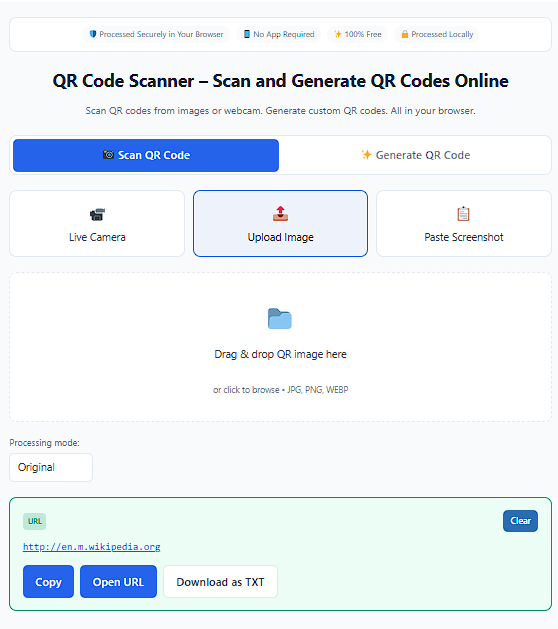
Drag & drop QR image here
or click to browse • JPG, PNG, WEBP
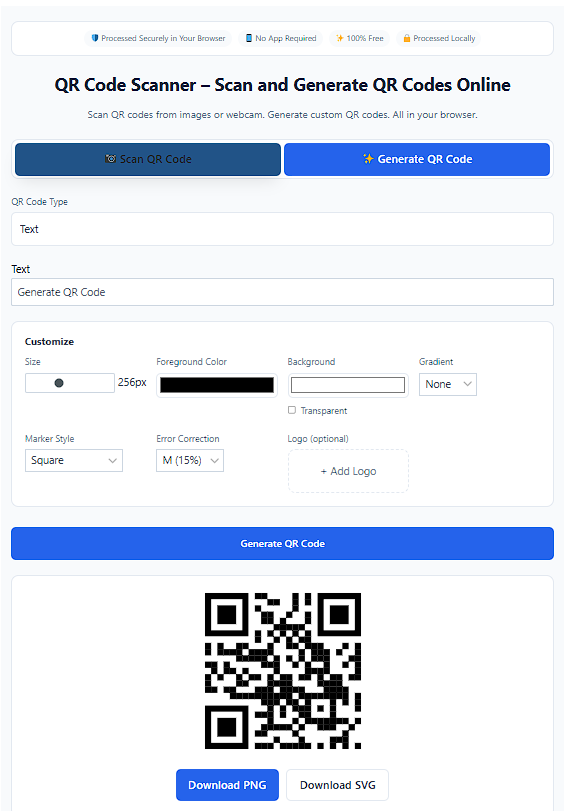
Customize
Free vs Pro
| Feature | Free | Pro |
|---|---|---|
| Unlimited Scans | ✓ | ✓ |
| Unlimited QR Generation | ✓ | ✓ |
| No Login Required | ✓ | ✓ |
| Static QR Codes | ✓ | ✓ |
| Dynamic QR (Editable Link) | Demo | ✓ |
| Scan Tracking Dashboard | Demo | ✓ |
| Expiration Date | Demo | ✓ |
This browser-based QR Code Scanner decodes QR code data quickly so you can access information right away. There is no need to download software or create an account. It works smoothly across devices and keeps the experience simple. Since everything runs locally in your browser, your data remains private.
Need to open a QR code saved on your device without installing another app? This QR Code Scanner helps you scan QR code from an image directly inside your browser within seconds. Whether the QR code is stored as an image file or captured using a webcam, everything is processed instantly and securely. It is built to handle everyday scanning needs without delays or confusion.
How to Scan a QR Code
Step 1
Upload a QR code image file or enable your webcam to scan live
Step 2
The QR Code Scanner automatically detects and processes the image..
Step 3
Your decoded QR code data appears within seconds.
QR Code Scanner From Image – How to scan a QR code
This QR Code Reader works as a smart QR reader that extracts hidden QR code data instantly as it scan QR from image. It uses decoding technology similar to the ZXing library and runs as a JavaScript-based QR Code Scanner inside your browser. No installation is required because everything operates through secure web-based processing.
The process ensures both speed and privacy. Image recognition handles slightly blurred or low-contrast images effectively. This makes the QR Code Scanner dependable even when image quality is not perfect.
Scanning a QR Code Online
You can use this platform as a complete online QR Code Scanner for different situations. It supports scanning through a phone camera, screenshot upload, or built-in webcam. The system works smoothly on iOS 11+ and Android 8+ devices without additional applications.
The browser-based QR Code Scanner ensures instant access without requiring downloads. It is compatible with modern browsers like Google Chrome, Safari, and Microsoft Edge. This flexibility makes scanning accessible from almost any device.
Upload QR Code Image File
You can upload your QR image using the file upload option or drag and drop it directly to scan QR code from picture. The QR Code Scanner also supports webcam live scanning for real-time detection. Supported image formats include JPG, PNG, and WEBP.
Advanced image processing ensures accurate decoding even if the image quality is slightly low. This improves reliability for screenshots or compressed images. It helps avoid repeated scanning attempts.
QR Code Scanner Results and Output
Once scanned, the QR Code Scanner displays complete QR code data instantly. The decoded content may include URLs, plain text, contact details, Wi-Fi credentials, or payment links. You can copy the scan results with one click.
This makes saving or sharing information simple. The output is clear and easy to read. You can immediately act on the scanned content without additional steps.
What Is a QR Code?
A QR scanner online is an advanced barcode designed to store digital information in a compact format. It can contain URLs, contact details, Wi-Fi credentials, payment links, and event details. Users can scan QR code data using a smartphone camera or an online QR Code Scanner. This allows instant access without manually typing long details.
QR codes are widely used in restaurants, retail stores, marketing campaigns, and digital payments. Their ability to store structured information makes them practical for both personal and business use. With a QR Code Scanner, accessing stored content becomes effortless.
Types of QR Codes
Static QR Codes
Static QR codes contain fixed content and permanent links that cannot be edited after creation. They are free to create and remain valid for lifetime use. Common examples include restaurant menus, flyers, and business cards. Static QR codes are reliable when the information does not need updates
Dynamic QR Codes
Dynamic QR codes are editable and more flexible for changing content. They support scan tracking, link updates after printing, and expiration date settings. These features make them ideal for marketing campaigns and performance monitoring. Dynamic QR codes are usually included in Pro plans.
How to Generate a QR Code
Step 1
Enter your URL, text, vCard, or Wi-Fi details into the generator.
Step 2
Customize colors, add a logo or frame to match your branding.
Step 3
Click create and download in PNG or SVG format of your choice.
Step 4
Test the QR code using the QR Code Scanner to ensure accuracy.
Free QR Code Generator With QR Scanner
Along with the QR Code Scanner, the platform provides a free QR code generator. You can create, customize, and download QR codes instantly in one place. It works similarly to QRGenerator.org , make a QR code and offers flexible design options.
You can generate and test QR codes without switching tools with this QR code generator free. This QR code maker saves time and keeps the workflow simple. Both scanning and creation are integrated smoothly.
About Our QR Code Scanner Platform
ScanQR is a free online QR Code Scanner designed for secure and efficient scanning. Since it operates inside your browser, files are processed locally without server storage. Data privacy and secure processing are always prioritized.
Your personal information is never stored. Instant decoding ensures quick access while maintaining confidentiality. This makes the platform suitable for both personal and professional use.
Common QR Code Scanner Issues and Solutions
| Issue | Description | Solution |
|---|---|---|
| Broken Links | Some users may experience broken links which can affect scanning performance. | Testing your QR code using the QR Code Scanner before printing helps avoid problems. |
| Small Print Size | Small print size can make the QR code difficult for cameras to detect and scan properly. | Increasing size improves readability and scanning performance. |
| Low Contrast | Low contrast between the QR code and background can reduce scanning accuracy. | Adjusting contrast improves readability. |
| Expired Dynamic Codes | Expired dynamic codes may stop working after a certain time period. | Checking link validity helps ensure the code works correctly. |
| Scanning Reliability | Scanning issues may occur due to design or quality problems. | Proper error correction levels also enhance reliability and ensure better scanning results. |
Supported QR Code Content Types
This wide support ensures flexibility for personal, business, marketing, and digital sharing purposes. The QR Code Scanner works seamlessly across these content types. It provides consistent and accurate decoding.
| Link & Contact QR Codes | Communication QR Codes | Media & File QR Codes | Social & Utility QR Codes |
|---|---|---|---|
|
Link QR Code Text QR Code vCard QR Code Business Card QR Code Event QR Code |
E-mail QR Code Phone QR Code SMS QR Code WhatsApp QR Code Skype QR Code Zoom QR Code |
MP3 QR Code Video QR Code PDF QR Code Image QR Code App Store QR Code |
Facebook QR Code YouTube QR Code LinkedIn QR Code Ratings QR Code Wi-Fi QR Code Location QR Code PayPal QR Code Bitcoin QR Code |
Features of Our QR Code Scanner Platform
| Free Access | No Signup Required | Customization Options | Advanced Features |
|---|---|---|---|
| Lifetime free access with unlimited QR codes and unlimited scans. Users can start scanning immediately without limitations. | No account or signup is required to use the QR Code Scanner. This ensures instant access and a smooth user experience. | Create QR codes with custom branding, colors, frames, and logos. These options allow personalized design for business or personal use. | Advanced tools include scan tracking, print-quality downloads, and additional Pro features for professional use. |
QR Code Customization Options
You can personalize your QR code design using foreground color, background color, transparent background, gradient color, and radial gradient. Advanced styling options include marker border, marker center, custom marker color, logo upload, frame label, frame color, font style, text size, and pattern and size adjustments.
Error correction levels L, M, Q, and H are available to improve scanning reliability. Higher correction levels increase durability and resistance to minor damage. This ensures stable performance when printed or shared digitally.
QR Code Scanner FAQs
What is a QR code scanner?
Scan QR codes using your camera or upload an image directly in your browser.
How do I scan a QR code without an app?
Open the scanner page, allow camera access, and point your device at the QR code.
Can I scan QR from a screenshot?
Yes, upload a screenshot and the tool will scan it instantly.
Is this QR scanner free?
Yes, it is completely free to use.
What can QR codes contain?
QR codes can store links, text, WiFi details, contacts, and more.
Does it work on mobile devices?
Yes, it works on Android, iPhone, tablets, and desktops.
Why is my QR code not scanning?
Make sure the image is clear, well-lit, and not damaged.